CLAUDE.md: the anatomy of a file that works
CLAUDE.md is context delivered as a user message, not applied configuration. Understanding that changes what you write in it and what has to become a hook.
- claude code
- claude.md
Contents
- What CLAUDE.md is, and what it does not guarantee
- The four scopes and how they add up
- Why 200 lines, and what to do with the overflow
- Imports: what they solve and what they do not
- .claude/rules/: where the overflow belongs
- How to write an instruction that gets followed
- When it is not working
- The skeleton I use
- Frequently asked questions
- Sources
Claude Code delivers CLAUDE.md as context in a user message, right after the system prompt. That single fact explains why the agent sometimes ignores it.
The sentence sits in the official documentation and seldom reaches the tutorials. The consequences are practical: a vague instruction competes with the rest of the conversation, a contradictory one gets resolved at random, and anything that needs a guarantee belongs somewhere else.
This guide is the file's anatomy: where it lives, how the scopes combine, why 200 lines is the right ceiling, and what to do with the overflow. Why your agent forgets covers what happens to that content once the session runs long.
What CLAUDE.md is, and what it does not guarantee
It is context. It carries no enforcement.
The documentation says so: "Claude treats both as context, not as applied configuration. To block an action regardless of what Claude decides, use a PreToolUse hook" (Claude Code Docs, accessed 19 August 2026).
The troubleshooting section makes the mechanics plain: the content arrives as a user message after the system prompt, and not as part of it. The agent reads it and tries to follow, with no guarantee of strict compliance, above all when an instruction is vague or conflicting.
That settles the most common argument about the file. Three causes account for almost every report that Claude ignored a CLAUDE.md:
- The file never loaded (the wrong scope, see below)
- The instruction is too vague to follow in a verifiable way
- Two instructions contradict each other, and the agent picked one at random
A fourth situation exists, and it belongs to the design: the instruction needed to be a hook. If something has to run at a fixed point in the cycle, before each commit or after each edit, write it as a hook. Hooks run as shell commands on lifecycle events and hold regardless of what the agent decides.
The four scopes and how they add up
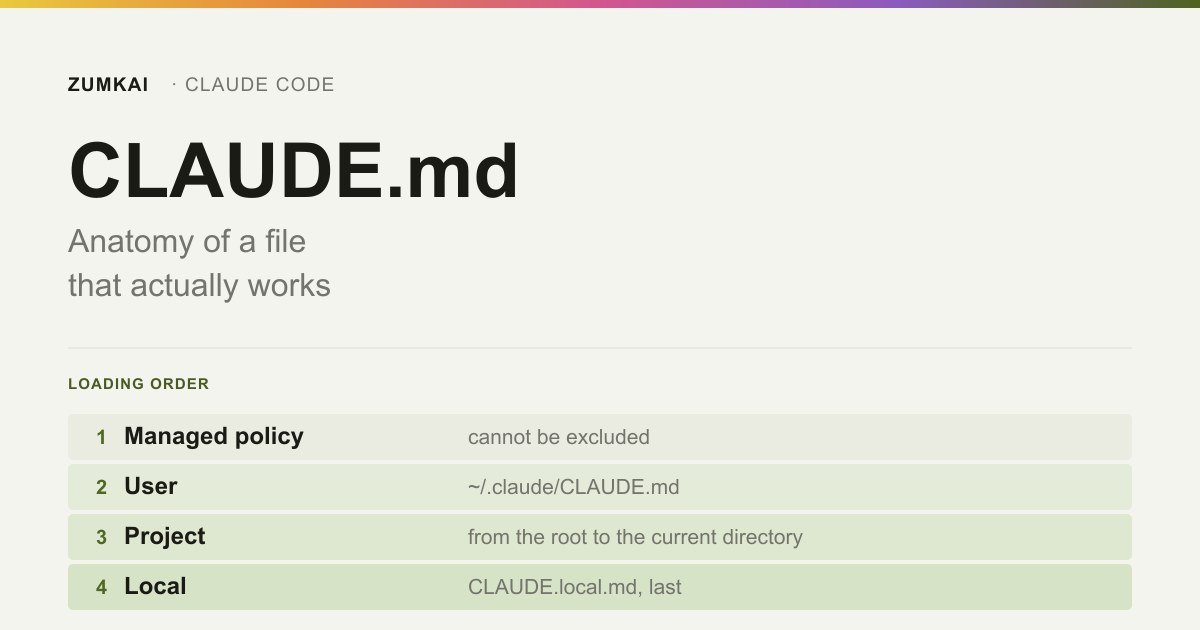
There is no single CLAUDE.md. Up to four load at once, ordered from the broadest to the most specific.
| Scope | Where | Shared with |
|---|---|---|
| Managed policy | Windows: C:\Program Files\ClaudeCode\CLAUDE.md · macOS: /Library/Application Support/ClaudeCode/CLAUDE.md · Linux and WSL: /etc/claude-code/CLAUDE.md | The whole organization |
| User | ~/.claude/CLAUDE.md | You alone, across every project |
| Project | ./CLAUDE.md or ./.claude/CLAUDE.md | The team, through version control |
| Local | ./CLAUDE.local.md | You alone, in this project |
An individual setting cannot exclude the managed policy. It can exclude the other three.
The detail that changes behavior: the files concatenate rather than override. Claude Code walks up the directory tree from your current directory and joins everything it finds. Running in foo/bar/, it loads foo/CLAUDE.md and foo/bar/CLAUDE.md, in that order, from the root down, so whatever sits closest to where you launched the session gets read last. Inside each directory, CLAUDE.local.md comes after CLAUDE.md.
Files in subdirectories below the current directory behave the other way: they skip startup and load when the agent reads a file from that folder.
In a monorepo this turns into a problem fast, because you inherit other teams' CLAUDE.md without asking. The way out is claudeMdExcludes in settings.local.json:
{
  "claudeMdExcludes": [
    "**/monorepo/CLAUDE.md",
    "/home/user/monorepo/another-team/.claude/rules/**"
  ]
}
Why 200 lines, and what to do with the overflow
Because the file enters the context of every session whole, and adherence drops as it grows.
The official recommendation is direct: aim under 200 lines per file, because longer files eat more context and cut adherence. The asymmetry is worth noting: automatic memory truncates MEMORY.md at the first 200 lines or 25 KB, while Claude Code loads CLAUDE.md whole, whatever its size. You have to trim it yourself.
Past the ceiling, three destinations exist, and picking the wrong one is the most common mistake:
| Destination | Loads when | Use it for |
|---|---|---|
CLAUDE.md | Every session | What holds true in every task in the project |
.claude/rules/ with paths | The agent reads a file matching the glob | A convention specific to one area of the code |
| Skill | Someone invokes it | A multi-step procedure |
The rule I use to decide: does this hold true in every task in this project? A naming convention, yes. A database migration procedure, no, and that one belongs in a skill.
A public measurement backs that criterion and cuts against the instinct to empty the file. Documenting what changes in the migration to Next.js 16, Vercel states that framework knowledge should come from always-loaded docs rather than skills, because in its own benchmark always-available context beat on-demand retrieval. Trimming CLAUDE.md means removing what the agent derives on its own, and not moving everything it needs in every task into a skill.
/doctor does half that pruning on its own for a versioned CLAUDE.md. It cuts what the agent can derive from the code itself (directory layout, dependency list, architecture overview) and keeps the traps, the justifications and the conventions that diverge from the tool's default. That is the right distinction: the file exists to say what sets the project apart, and not to describe the project.
Imports: what they solve and what they do not
They organize. They save no context.
The syntax is @path/to/file, and it works anywhere in the text:
See @README for the overview and @package.json for the npm commands.

# Additional instructions
- git flow @docs/git-instructions.md
Four rules worth knowing:
A relative path resolves from the file that imports it, not from the working directory. Getting that wrong breaks the import in silence.
Recursion goes four hops deep. An imported file can import another.
A backtick escapes the import. Writing `@README` in backticks keeps the literal text, because the parser skips code spans and code blocks. Without it, mentioning a path in prose would import the file.
An import does not reduce context. This is the one that disappoints. Splitting a 400-line CLAUDE.md into five 80-line imports organizes the reading for humans and loads the same tokens at startup. To cut context for real, the route is .claude/rules/ with paths, or a skill.
One protection catches people working on a shared project: an import of a project file that resolves outside the working directory triggers an approval dialog the first time. Refuse it and the imports stay off, with no second prompt. Imports in user scope skip that, because you wrote those files yourself.
And if the repository already uses AGENTS.md for other agents: Claude Code does not read AGENTS.md. Create a CLAUDE.md that imports it.
@AGENTS.md

## Claude Code
Use plan mode for changes in `src/billing/`.
A symlink works too, but on Windows it needs administrator privilege or Developer Mode, so on Windows prefer the import.
.claude/rules/: where the overflow belongs
It is the one way to write more instruction without paying more context in every session.
The structure is one file per subject, found by walking the tree:
your-project/
├── .claude/
│   ├── CLAUDE.md
│   └── rules/
│       ├── code-style.md
│       ├── testing.md
│       └── frontend/
│           └── components.md
A rule without paths frontmatter loads at startup, at the same priority as .claude/CLAUDE.md. Without paths, you moved the problem to another file and nothing else.
The gain lives in path scoping:
---
paths:
  - "src/api/**/*.ts"
---

# API rules

- Every endpoint validates its input
- Use the standard error response format
That rule enters the context when the agent reads a file matching the glob. It fires on the read, and not on each tool use.
| Pattern | Matches |
|---|---|
**/*.ts | Every TypeScript file, in any folder |
src/**/* | Everything below src/ |
*.md | Markdown in the root only |
src/components/*.tsx | Components in one specific folder |
Brace expansion multiplies patterns: src/*.{ts,tsx} becomes two, and {a,b}/{c,d}/*.{ts,tsx} becomes eight. The whole paths list shares a budget of 1,000 expanded patterns and 4 MiB; a pattern without braces does not count. Blow the budget and Claude Code uses the unexpanded pattern, at which point the literal braces match no file at all.
A syntax trap: the glob treats [ as the start of a bracket expression. photos [2024/** is invalid and matches nothing, though the other patterns in the same rule keep working. For a literal bracket, escape it: photos \[2024/**.
User rules in ~/.claude/rules/ apply across every project on the machine and load before the project ones, which gives the project's higher priority. The directory accepts symlinks, so you can keep one shared set and link it into several repositories.
How to write an instruction that gets followed
Concrete enough to verify. The documentation's examples show the pattern:
| Instead of | Write |
|---|---|
| "Format the code correctly" | "Use 2-space indentation" |
| "Test your changes" | "Run npm test before committing" |
| "Keep the files organized" | "API handlers live in src/api/handlers/" |
The test is simple: can you look at the result and see whether the agent followed it? If you cannot, the agent cannot either.
Three habits do the rest of the work:
Structure with headings and bullets. The agent scans structure the way a reader does: an organized section is easier to follow than a dense paragraph.
Periodic review for contradictions. If two rules contradict each other, the agent picks one at random. Reread the project's CLAUDE.md, the nested ones in subfolders and .claude/rules/ now and then, looking for conflicts and stale content.
HTML comments for notes to humans. Claude Code strips block comments before the content enters the context. You can leave a message for whoever maintains the file without spending a token:
<!-- This section exists because of the 12 March incident. Do not remove
     without talking to the infra team. -->
- Never run a migration straight against production.
Comments inside a code block survive, and the file opened through the read tool shows everything.
When it is not working
The diagnostic order, from the most probable down.
1. Did the file load? /context lists what entered the session under Memory files. That command and the others named here sit in the complete Claude Code command reference. If your file is missing from that list, the agent cannot see it, and no amount of rewording fixes that. /memory opens the files for editing.
2. Is the instruction verifiable? Go back to the table above.
3. Is there a contradiction? Between scopes, between nested CLAUDE.md files, or with .claude/rules/.
4. Did it vanish after /compact? The project root's CLAUDE.md survives compaction: the agent rereads it from disk and reinjects it. Nested CLAUDE.md files in subfolders and rules with paths: do not come back on their own; they return the next time the agent reads a file from that folder or one that matches the pattern. If the instruction disappeared, either it lived in the conversation alone, or it sits in a nested file that has yet to reload.
5. Do you need a log? The InstructionsLoaded hook records which instruction files loaded, when and why. It is the right tool for debugging a rule with paths and on-demand loading.
The skeleton I use
It fits in under 200 lines and covers what matters.
# Project

<!-- Keep under 200 lines. Anything that grows becomes .claude/rules/ or a skill. -->

## Stack
- Next.js 16 (App Router), strict TypeScript, Tailwind
- Database: Postgres through Prisma
- Deploy: a push to main triggers the build

## Commands
- `npm run dev` — development
- `npm test` — run before committing
- `npm run lint` — required before a PR

## Conventions
- 2-space indentation
- Components in `src/components/`, one per file
- API handlers in `src/api/handlers/`
- File names in kebab-case, components in PascalCase

## What diverges from the default
- We do not use barrel files: import straight from the file
- Dates always in UTC in the database, converted at the display edge
- `any` is forbidden; use `unknown` and narrow it

## Known traps
<!-- This list came from real mistakes. Do not trim without the context. -->
- The middleware became `proxy.ts` in Next 16 — older code still says middleware
- The database seed wipes everything. Never run it with a staging DATABASE_URL
Notice what is missing: the architecture description, the dependency list, the directory layout. The agent derives all of that by reading the code, and that is what /doctor cuts. The rest is what it could not guess: what diverges from the default and what has already gone wrong.
CLAUDE.md is the first of the five layers of a setup that survives production, and the one holding up the other four. The mechanism behind it sits in why your agent forgets.
Frequently asked questions
What is the difference between CLAUDE.md and automatic memory?
You write CLAUDE.md; the agent writes automatic memory. The first holds instructions and rules, the second holds what the agent worked out on its own. Both load in every session, but automatic memory lives in ~/.claude/projects/<project>/memory/ and only the MEMORY.md index enters at the start, with the topic files read on demand.
Should I use /init or write it by hand?
/init first. It analyzes the code and generates a starting file with build commands, testing instructions and the conventions it found. If a CLAUDE.md already exists, it suggests improvements instead of overwriting. Then refine it with what the agent had no way to discover: the traps and the decisions.
Does splitting into imports cut the context cost?
No. An imported file loads at startup all the same. Imports serve to organize. To cut context, use .claude/rules/ with paths, because those rules enter only when the agent reads a matching file.
What do I do with an instruction that has to hold at all times?
If it needs a guarantee, CLAUDE.md is the wrong place. An instruction that has to run at a fixed point in the cycle becomes a hook. Blocking a tool, a command or a path becomes permissions.deny in the settings. CLAUDE.md guides behavior; it forms no enforcement layer.
Sources
- Anthropic — Claude Code Docs: How Claude remembers your project. Accessed 19 August 2026.
- Anthropic — Claude Code Docs: Automate actions with hooks. Accessed 20 August 2026.
- Anthropic — Claude Code Docs: Skills. Accessed 19 August 2026.
- Anthropic — Claude Code Docs: Manage costs effectively. Accessed 19 August 2026.
- Anthropic — Claude Code Docs: Settings. Accessed 20 August 2026.
Verified on 19 August 2026.
Review trigger: revisit when (a) the recommended 200-line target changes, (b) CLAUDE_CODE_NEW_INIT comes out from behind the environment variable and becomes the /init default, or (c) the precedence order between scopes or the post-/compact reinjection behavior changes.
Read next

Motion •
Motion Design for the Web: The Complete Guide
Scroll, text, images and video: the complete catalog of motion techniques for the web, with implementation in Next.js and the cases where each one pays off.
- motion
- scroll

The definitive guide — a Next.js site built around motion and scroll
The scroll foundation that, when missing, keeps the animations from working at all: Lenis, GSAP and Next.js wired in the right order and the mistakes to avoid.
- next.js
- lenis

Infra •
Documentation: deploying a Next.js application with GitHub + Hostinger
Every push becomes a live site with no hosting panel involved: connecting GitHub to Hostinger, the build settings that break and the checks after each deploy.
- deploy
- github