Context engineering: the four pillars and why a full window hurts
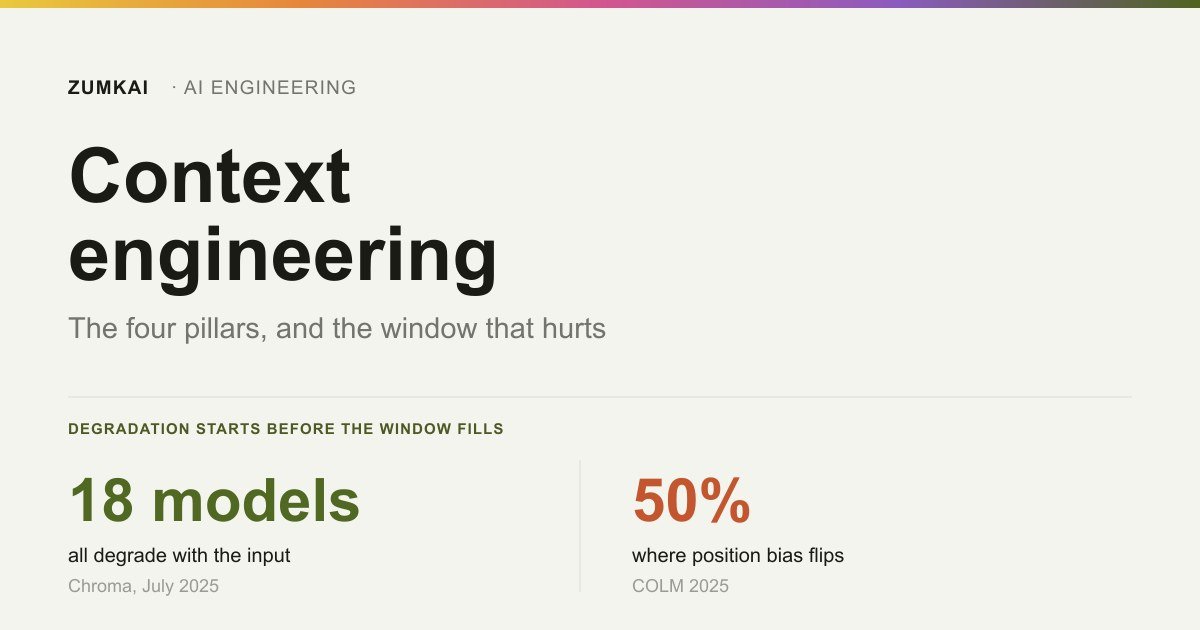
Across 18 models tested, performance falls as the input grows, before the window fills. The four pillars for keeping context small.
- context engineering
- context rot
Contents
- What context engineering is, and what it is not
- Degradation starts before the window fills
- Where the important information should sit
- The four pillars, and the two lists that confuse people
- The context file: who writes it matters
- This blog's context
- How to know it is working
- Frequently asked questions
- What to take away
A model with a 200 thousand token window can lose a meaningful amount of ground at 50 thousand.
That is no window overflow. Overflow happens when you pass the limit and the system refuses. Degradation starts long before, while space still remains, and nobody warns you.
In July 2025, a team tested 18 models from four vendors and found the same behavior in all of them: reliability falls as the input grows, on trivial tasks included.
The authors' conclusion sums up this post's subject: models make uneven use of the context. Having the information in there differs from the model using it.
What context engineering is, and what it is not
Context engineering is deciding what enters the window, when it enters and in what form. Prompt engineering picks the words of the instruction; context engineering manages everything accompanying the instruction.
The difference gets clear from what each one controls. A prompt is a writing decision, made once. Context is an architecture decision, made at every step: what to fetch, what to load, what to summarize, what to throw away.
This post covers the architecture. The window's behavior in day-to-day Claude Code work, with the symptoms that show up in a long session, sits in why your agent forgets mid-task. Here the question is different: why the degradation happens, and what the families of solution are.
Degradation starts before the window fills
The reference work is "Context Rot: How Increasing Input Tokens Impacts LLM Performance", by Kelly Hong, Anton Troynikov and Jeff Huber, published by Chroma on 14 July 2025 (trychroma.com, accessed 28 August 2026).
It covered 18 models: five from Anthropic, seven from OpenAI, three from Google and three from Alibaba. All of them showed degradation at every length increment tested.
Six experiments, and three findings change how you assemble a prompt.
One distractor is enough. With a single plausible, wrong answer inserted into the context, accuracy already falls against the clean case. With four, it falls further. And the effect amplifies as the length grows, across every model family tested.
Focused beats complete, by a wide margin. On LongMemEval, the researchers compared a complete context of 113 thousand tokens against a focused version of 300 tokens. The difference was substantial. Claude Opus 4 showed the largest disparity and tended to abstain when uncertain; OpenAI's models hallucinated more in the presence of distractors.
It degrades even without reasoning. In a literal word-copying test, with lengths from 25 to 10 thousand, performance fell as the text grew. No inference entered into it, only repetition. Accuracy ran higher when the unique words appeared early in the sequence.
That last result is what closes the argument. If degradation appears on a task with no reasoning, it is no failure of comprehension. It is a property of how attention distributes over long inputs.
What counts as a distractor in your context
The distractor finding deserves translation, because "irrelevant information" sounds vague and the real case is specific.
A distractor is no random content. It is content that is plausible, on the same subject and wrong for that question. Text on another topic the model discards with ease; text on the same topic, carrying another case's answer, is what confuses it.
In an ordinary operation, the distractors tend to be these:
- Documentation from an earlier version loaded alongside the current one.
- Code examples from a similar case, which answer a different question.
- A history of failed attempts, kept in the context "so the agent does not repeat them", which in practice teaches the wrong path in rich detail.
- Whole files when only one function mattered.
- Unfiltered tool output, with fifty lines when three answered.
The third item is the most treacherous, because the intention is good. Keeping the earlier error in sight seems prudent, and it puts a detailed, plausible version of the wrong answer into the context, on the same subject. It is the definition of the distractor the research measured.
The practical rule coming out of that: when you cut, cut what is similar before cutting what is different. Distant irrelevance costs tokens. Nearby irrelevance costs accuracy.
Where the important information should sit
The rule almost everyone learned, put the essentials at the start, has an expiry date, and the date is half the window.
In "Positional Biases Shift as Inputs Approach Context Window Limits", Blerta Veseli, Julian Chibane, Mariya Toneva and Alexander Koller measured how positional bias shifts as the input occupies more of the window (arXiv 2508.07479, COLM 2025, August 2025). The methodological innovation was using length relative to each model's window, instead of absolute length.
The result:
While the input occupies up to 50% of the window, the familiar U pattern appears: the model retrieves what sits at the start and the end better, and what sits in the middle worse. Above 50%, primacy bias weakens and recency bias stays stable. The pattern turns into degradation by distance: the closer the relevant information sits to the end, the better.
The practical consequence is direct. In a short session, the critical instruction at the top works. In a long session, it needs repeating near the end, because the top lost the advantage it had.
That explains a behavior many people attribute to forgetting: the agent that ignored the rule from the start of the conversation never forgot it. The rule stayed where the model started looking less.
The four pillars, and the two lists that confuse people
<!-- [UNIQUE INSIGHT] -->
Two formulations of four strategies circulate, under different names. They describe the same four things.
| LangChain formulation | Anthropic formulation | What it does |
|---|---|---|
| Write | structured note-taking | keep it outside the window, in a scratchpad or file, so it survives the cycle |
| Select | just-in-time retrieval | bring the right information at the moment it is needed |
| Compress | compaction | reduce what already sits in the window to what still matters |
| Isolate | sub-agents | split the work into separate windows, so one task never contaminates another |
Anyone who met the two lists in different places comes away thinking eight techniques exist. There are four.
Write
Take out of the window whatever needs to survive it. A plan file, a progress scratchpad, a list of decisions taken.
The criterion for what to write is the one that already appeared in this cluster's pillar: keep decisions and constraints, discard transcripts. The full conversation history grows without limit and pushes out what matters.
Select
Fetch on demand instead of dumping everything as a precaution.
The LongMemEval experiment is the argument: 300 focused tokens beat 113 thousand complete ones. Loading "as insurance" is the most common way to worsen the result while believing you are helping.
A tool definition also occupies the window on every request, even when it goes unused, which is what the post on tool design measured as an accuracy cliff.
Compress
Summarize what already sits in the window, preserving the essentials.
There is a specific trap here: compaction summarizes everything, including the rules no summary should touch. A security constraint that turns into a vague line in the summary stopped being a constraint.
The practice that solves it is marking a file as persistent and non-compactable, and instructing the agent to treat that content as unchangeable even while compressing the rest. It is the same logic as the guardrails layer: what cannot fail stays out of reach of interpretation.
Isolate
Give each subtask its own window, so one never contaminates another.
It is the most expensive pillar and the most effective when the task is large. Each subagent starts clean, with the tool menu and the context of its own scope, and returns the result alone. The criterion for when it pays sits in when to delegate to a subagent.
Which pillar to use first
The four do not apply at the same moment. The symptom points to where to start.
| Symptom | Pillar | Concrete action |
|---|---|---|
| The agent ignores a rule given at the start of the session | write and repeat near the end | take the rule out of the history and put it in a file reread at every step |
| It loads whole files to use one function | select | search by excerpt instead of reading in full |
| The long session turns slow and expensive without turning better | compress | periodic summary, with rules marked as non-compactable |
| One subtask contaminates the next with context that has no bearing | isolate | a subagent with its own window and scope |
The order of cost also helps you decide. Writing and selecting cost little and pay back the same day. Compressing requires deciding what never disappears from the summary, which is a risk decision. Isolating is the most expensive, because it changes the architecture and adds coordination.
Start with the first two. If the problem persists with the window still under half full, the odds are it has nothing to do with context, and insisting on the other two pillars will cost architecture without delivering a result.
The context file: who writes it matters
Writing an AGENTS.md or CLAUDE.md at the root is the most repeated recommendation about context. A February 2026 study showed it comes with a condition.
Researchers at ETH Zurich built AGENTbench, with 138 real issues from 12 niche Python repositories, all of them with a context file written by the developers themselves (arXiv 2602.11988). They tested four agents, meaning Claude Code with Sonnet 4.5, Codex with GPT-5.2 and with GPT-5.1 mini, and Qwen Code with Qwen3-30B, across three scenarios: no file, an LLM-generated file and the developer's file.
| Scenario | Result |
|---|---|
| LLM-generated file | cut the success rate in 5 of 8 scenarios tested |
| Additional steps per task | 2.45 to 3.92 |
| Inference cost | +20% to +23% |
| Human-written file | beat the generated one across all four agents, gaining around 4 points |
The correct reading is not "context files do not work". It is that who writes it flips the sign of the result.
The probable explanation connects to the distractor section. A file generated by machine tends to document what the agent already deduces on its own by reading the repository: the folder structure, the package.json scripts, the dependencies. That informs nothing new and occupies the window, which is the definition of a distractor: plausible, irrelevant content.
That qualifies without contradicting the anatomy of a good CLAUDE.md, which this blog published before the study existed. The criterion there still holds, and now it has a measurement: write what is true about the project and is not deducible from the code.
This blog's context
<!-- [PERSONAL EXPERIENCE] -->
This repository's AGENTS.md has three lines. It says this version of Next.js brings breaking changes, that APIs and conventions may differ from what the model learned, and that the local documentation should be read before writing any code.
That is all. Nothing about folder structure, nothing about scripts, nothing about the stack.
It ended up that way for an unglamorous reason: an error happened. The agent wrote code with the old API, the build broke, and the fix became those three lines. It is the format the ETH study favors, and it got here by accident, not by reading best practices.
Recording what does not exist in this operation is worth doing, because that list is longer than the previous one.
There is no automatic compaction. Once the session gets long, it gets long. There is no memory between sessions: each one starts from zero, and what survives is whatever sits written in a file in the repository. There is no retrieval on demand, since the context gets assembled by hand, by me, on each task.
The cost of that shows up where the research predicts. In long sessions, the start loses force, and the agent stops following instructions given early. The correction I use is the simplest and the least elegant: restart with a summary written by hand, which is the "write" pillar executed by a person instead of by a system.
Of the four pillars, this blog uses one and a half.
That is honest and it is also enough for the scale I operate at. Three posts a week, sessions of a few hours, a repository that fits in one head. The absence of compaction and memory would only start to hurt at greater volume or with more people touching the same project. I record the gap without turning it into an urgency it lacks.
How to know it is working
Context work pays back a result that is hard to feel: things stop failing as much. Three numbers make that visible.
Input tokens per task. It is the direct measure of what you are loading. If it rises without the task getting bigger, something entered the window uninvited: a new tool, a file loaded whole, a history nobody prunes any more.
Share of the window occupied. This is the number the 50% finding makes actionable. While the average stays under half, the instruction at the top keeps working. Once it passes, you have to repeat what is critical near the end.
Steps to completion. It rises when the agent loses information and redoes work. It is the same leading indicator that appears in agent observability, and here it serves to catch context degradation before quality falls.
All three come out of the trace you already have, if you instrumented the previous layer. None requires a new tool.
One cheap test closes the diagnosis: take a task that failed in a long session and repeat it in a fresh session, with minimal context. If it passes, the problem was context and not capability. It is the same design as the experiment that compared 113 thousand tokens against 300.
Frequently asked questions
What is context engineering?
It is the practice of deciding what enters a model's context window, at what moment and in what format. It includes keeping information outside the window, fetching on demand, compressing what already sits there and separating tasks into distinct windows. The motivation comes from measurement: across 18 models tested by Chroma in 2025, performance fell as the input grew, on simple tasks and before the window filled.
What is the difference from prompt engineering?
Prompt engineering picks the words of the instruction, and it is a writing decision made once. Context engineering manages everything accompanying the instruction, meaning documents, history, tool results and memory, and it is an architecture decision revisited at each step of the agent. The first improves how you ask; the second decides what the model holds when it answers.
Why does the agent get worse with long context?
Because models make uneven use of the context. Degradation appears even on tasks with no reasoning, such as copying text word for word, which points to a property of attention rather than a failure of comprehension. A single distractor already reduces accuracy, and the effect amplifies as the input grows. That happens well before the window's limit: a model with 200 thousand tokens of capacity can degrade in a meaningful way at 50 thousand.
Is writing an AGENTS.md worth it?
It is, if you are the one writing it. In the ETH Zurich study with 138 real issues, developer-written files beat LLM-generated ones across all four agents tested, with around 4 points of gain. The generated ones cut the success rate in 5 of 8 scenarios, added 2.45 to 3.92 steps per task and raised cost by over 20%. Write what is true about the project and is not deducible from the code.
Do I need a vector database for this?
Not to start. Of the four pillars, only "select" sometimes asks for search infrastructure, and even it works with simple means: text search in the repository, reading an excerpt instead of a whole file, an index of files by subject. Writing, compressing and isolating depend on no database. Building vector retrieval pays off when the volume of material makes simple search insufficient, and not before.
Does a bigger window solve the problem?
It does not, and it can worsen the impression of the problem. Degradation is a function of input length, not of distance to the limit, so a bigger window only lets you travel further into the zone where performance already fell. And above 50% fill, positional bias shifts, and information placed at the start loses the advantage it had in short contexts.
What to take away
- Context rot is no overflow. It is quality falling while space still remains, and it appeared across the 18 models tested.
- One distractor is enough to reduce accuracy, and the effect grows with length.
- "Lost in the middle" holds up to 50% of the window. Above that, whatever sits near the end wins, so repeat the critical instruction.
- The four pillars are write, select, compress and isolate. The two naming schemes describe the same four.
- A context file written by a human pays; generated by an LLM it costs. Write what is not deducible from the code.
The next two posts in the cluster open two of those pillars: memory, which is "write" done in earnest, and retrieval, with the question of whether RAG still makes sense. The map of the five layers continues in the pillar on harness engineering.
Read next

Motion •
Motion Design for the Web: The Complete Guide
Scroll, text, images and video: the complete catalog of motion techniques for the web, with implementation in Next.js and the cases where each one pays off.
- motion
- scroll

The definitive guide — a Next.js site built around motion and scroll
The scroll foundation that, when missing, keeps the animations from working at all: Lenis, GSAP and Next.js wired in the right order and the mistakes to avoid.
- next.js
- lenis
Infra •
Documentation: deploying a Next.js application with GitHub + Hostinger
Every push becomes a live site with no hosting panel involved: connecting GitHub to Hostinger, the build settings that break and the checks after each deploy.
- deploy
- github