Text animation: SplitText, clip-path and what CSS already does
Half the text effects need no splitting into pieces. The question that separates the two families, and what SplitText solves that CSS does not.
- motion design
- css
Contents
- The question that separates the two families
- Without splitting the text: what CSS already delivers
- When splitting is unavoidable
- When splitting is the wrong answer
- The two problems almost nobody mentions
- Accessibility: the default changed, for the better
- propIndex: the bridge between the two families
- Cost and cleanup
- Frequently asked questions
- Sources
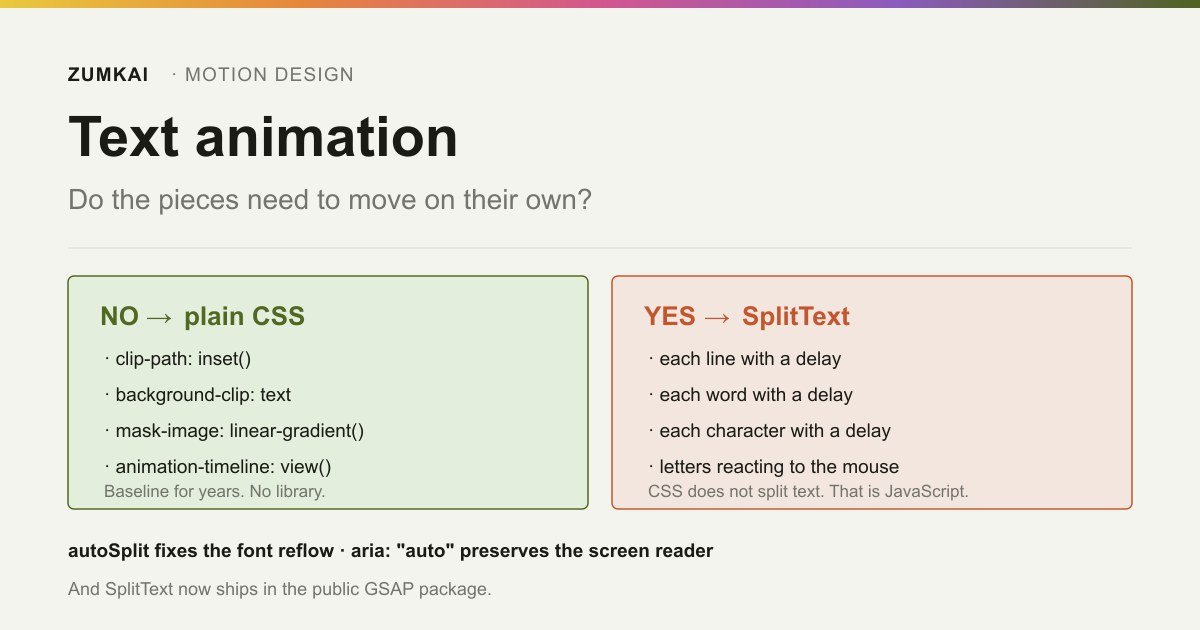
One question separates almost every text effect into two families: do the pieces have to move on their own?
If not, CSS solves it alone, with one line and no library. If so, you have to split the text into elements, and there no native equivalent exists. The common error is installing the library to do what the first family already solved.
The question that separates the two families
Before choosing a tool, classify the effect.
| Effect | Needs splitting? | How to do it |
|---|---|---|
| Bottom-up reveal, whole block | No | clip-path or transform |
| Gradient running inside the letters | No | background-clip: text |
| Text emerging from behind a mask | No | clip-path or mask-image |
| Underline growing on hover | No | transform: scaleX |
| Each line entering with a delay | Yes | SplitText, lines type |
| Each word with a delay | Yes | SplitText, words type |
| Each character with its own delay or position | Yes | SplitText, chars type |
| An individual letter reacting to the mouse | Yes | SplitText, chars type |
The first four rows are most of what a corporate site asks for. They need no library at all.
Without splitting the text: what CSS already delivers
Reveal with clip-path. The property has been Baseline since January 2020, and the basic shapes animate with smooth interpolation. An inset() going from 100% to 0% gives the classic reveal:
.title {
  clip-path: inset(0 0 100% 0);
  transition: clip-path .8s cubic-bezier(.2,.8,.2,1);
}
.title.visible {
  clip-path: inset(0 0 0 0);
}
Two documented caveats. Values in url(), pointing at an SVG <clipPath>, animate in no way: only the basic shapes interpolate. And any value other than none creates a new stacking context, the same side effect as an opacity below 1.
Gradient inside the letters with background-clip: text. Baseline since July 2015. The text has to go transparent for the background to show:
.gradient {
  background: linear-gradient(90deg, #4f6420, #c4552f);
  background-clip: text;
  color: transparent;
  text-shadow: none;
}
MDN is explicit about three cautions here, and none of them is theoretical:
- Check the contrast between background and text, because someone with low vision has to read it.
- Declare a fallback
background-color, so the text survives a failed background image. - Use
@supports (background-clip: text)and offer an accessible alternative where support is missing.
Reveal with mask-image. It is the third native technique, and the most flexible of the three, because the mask's gradient controls the softness of the edge. Unlike clip-path, which cuts hard, a mask allows a feathered transition:
.line {
  mask-image: linear-gradient(to right, #000 0 0, transparent 0 100%);
  mask-size: 200% 100%;
  mask-position: 100% 0;
  transition: mask-position 1s ease;
}
.line.visible { mask-position: 0 0; }
What animates here is the mask's position, not its shape. That avoids the new stacking context clip-path creates, and it keeps the work in properties the compositor handles.
Choose between the two like this: clip-path when the cut's edge is straight and sharp, mask-image when you want a gradient or an irregular shape.
Reveal tied to scroll, with no JavaScript. For the most common case of all, appearing as it enters the screen, animation-timeline: view() exists, and it runs on the compositor thread. The breakdown sits in CSS scroll-driven with no JS.
When splitting is unavoidable
No way exists today, in CSS, to divide a paragraph into addressable lines, words or characters. ::first-line reaches the first line and stops there. For a staggered delay per piece, the text has to become elements, and that is JavaScript.
GSAP's SplitText is the mature tool for that, and since the licensing change it ships in the public package. I confirmed it by reading the file published in version 3.15.0: the header carries GreenSock's "no charge" license, the same one the post on free GSAP breaks down.
The minimal use:
import { SplitText } from "gsap/SplitText";
gsap.registerPlugin(SplitText);

SplitText.create(".title", {
  type: "lines",
  mask: "lines",
  autoSplit: true,
  onSplit(self) {
    return gsap.from(self.lines, {
      yPercent: 100,
      opacity: 0,
      stagger: 0.08,
      duration: 0.9,
      ease: "power3.out",
      onComplete: () => self.revert(),
    });
  },
});
Four choices in that block deserve explanation.
type takes chars, words and lines, combined with commas, and the default is all three together. Asking for all three when you animate lines alone creates three times more elements than necessary. Ask for what you will animate and nothing else.
mask wraps each piece in an extra element that clips the content. It is what makes the line "rise from inside" instead of sliding over the rest. Without it, you would set up the overflow: hidden by hand. It takes one type at a time.
onSplit is where the animation should be born, and it is no aesthetic detail: it runs again on each new split, which matters because of the next item.
revert() restores the original innerHTML. Once the animation ends, the extra elements serve nothing and keep weighing on the DOM and the accessibility tree.
The other fields worth knowing
The configuration goes beyond the four in the example. These are the ones I use in practice:
| Field | Default | What it does |
|---|---|---|
type | "chars,words,lines" | Which pieces to create. Ask for what you will animate |
mask | absent | Wraps each piece in a clip. One type at a time |
autoSplit | false | Splits again when the font loads or the width changes |
aria | "auto" | aria-label on the parent, aria-hidden on the pieces |
linesClass | absent | A class on the lines. With "++" at the end, it numbers them |
wordsClass | absent | The same, for words |
charsClass | absent | The same, for characters |
propIndex | false | Creates CSS variables with each piece's index |
smartWrap | false | Prevents breaking inside a word in a character-only split |
ignore | absent | Descendant elements left out of the split |
deepSlice | true | Subdivides a nested element crossing two lines |
reduceWhiteSpace | true | Collapses consecutive spaces into one |
tag | "div" | The element used as the pieces' wrapper |
wordDelimiter | space | The word separator, taking a string or a regular expression |
Two of them solve specific irritations. The "++" suffix on the classes, as in charsClass: "letter++", generates letter1, letter2 and so on, which lets you target a specific piece in CSS without counting children. And ignore keeps an element inside the block intact, useful when the heading holds a brand <span> or an icon that should never become a loose character.
When splitting is the wrong answer
Needing the pieces fails to justify the split on its own. Three situations where I back off even with the effect in mind.
Long reading text. An article, a product description, any block the person will read for real. Splitting multiplies the DOM and, more important, disturbs the accessibility tree of content that needs reading, not admiring. Reserve splitting for headings, pull quotes and a featured number.
Text that changes after mounting. In a component that re-renders, each update has to revert and split again, or the pieces fall out of sync with the content. Doing it works, and the maintenance cost seldom justifies a decorative effect. Once the text comes from state, prefer animating the block.
Text people have to copy. A character split inserts elements between the letters. Depending on how you build the wrappers, mouse selection and copy-paste come out with odd spacing. Testing it by selecting the passage before approving pays off, because it is the kind of defect nobody notices until a client complains.
The reduceWhiteSpace field, on by default, helps with the third case by collapsing consecutive spaces, and it solves nothing on its own. Test the selection.
The two problems almost nobody mentions
The first is the font that loads later. You split the text into lines, the web font finishes loading, the metrics change, the text reflows, and the split you made no longer matches the lines on screen. The result is a break in the wrong place, sometimes an orphan line holding one word.
autoSplit: true solves it: it reverts and splits again when the fonts finish loading or when the element's width changes. That is why the animation has to be born inside onSplit, so it gets recreated alongside. The field defaults to false, so it is opt-in.
The second is how the text gets cut into characters. Splitting a string by position breaks emoji, letters with combining marks and non-Latin scripts, because a visible character is not always one code unit. Reading the published source of 3.15.0, SplitText instantiates Intl.Segmenter when the browser offers it, and uses that to segment. In practice, a composed emoji stays whole instead of becoming two meaningless pieces.
For Portuguese that matters little day to day, and it matters a lot the moment someone puts an emoji in the hero heading.
Accessibility: the default changed, for the better
The historical criticism of splitting text is that the accessibility tree turns to garbage: the screen reader starts announcing letter by letter, or a loose word with no punctuation.
SplitText handles that by default. The aria field arrives as "auto", which puts an aria-label with the original text on the parent element and marks the pieces as aria-hidden. The screen reader reads the sentence, not the shards. The other values are "hidden", which hides the pieces alone, and "none", which touches nothing.
Knowing that is the default pays off, and leaving it alone pays off more.
On the movement side, text animation is one of the cases where prefers-reduced-motion carries the most weight: a character entering from a random position is the precise kind of displacement that bothers people. The path is replacing, not switching off:
const mm = gsap.matchMedia();

mm.add({
  reduced: "(prefers-reduced-motion: reduce)",
  normal: "(prefers-reduced-motion: no-preference)",
}, (ctx) => {
  const { reduced } = ctx.conditions;
  SplitText.create(".title", {
    type: reduced ? "lines" : "chars,words,lines",
    autoSplit: true,
    onSplit(self) {
      return gsap.from(reduced ? self.lines : self.chars, {
        opacity: 0,
        y: reduced ? 0 : 40,
        stagger: reduced ? 0.04 : 0.02,
        duration: reduced ? 0.3 : 0.8,
      });
    },
  });
});
With the preference on, the effect becomes a fade per line, with no displacement. The full substitution table by effect type sits in prefers-reduced-motion.
propIndex: the bridge between the two families
A little-used SplitText field closes the distance between splitting the text and animating in CSS.
With propIndex: true, each piece receives a CSS variable holding its index, such as --word: 1, --word: 2 and so on. You use JavaScript to split alone, and let CSS handle the delay:
.word {
  animation: arrive .6s both;
  animation-delay: calc(var(--word) * 40ms);
}

@keyframes arrive {
  from { opacity: 0; transform: translateY(12px); }
}
The gain is architectural. The stagger becomes the stylesheet's responsibility, changes with a media query without touching JavaScript, and disappears inside a prefers-reduced-motion block with no conditional in the code.
Cost and cleanup
Splitting text multiplies the DOM. A 40-word paragraph with type: "chars,words,lines" produces a few hundred elements, each with its own style. Three habits avoid the problem.
Ask for the type you will animate and nothing else. type: "lines" for a line reveal, and no more than that.
Revert when it finishes. onComplete: () => self.revert() restores the original innerHTML and cleans everything, as in the example at the start.
Split only what is visible. A ScrollTrigger firing the creation near the viewport avoids splitting ten text blocks on load. The patterns sit in ScrollTrigger: the 8 patterns.
For the decision that comes before all of that, whether the project should load GSAP, the decision tree between GSAP, Motion and pure CSS settles it in three questions. And the larger context sits in the complete guide to motion design for the web.
Frequently asked questions
Can text be split into lines with CSS alone?
No. CSS reaches the first line with ::first-line and offers no way to address line by line, word by word or character by character. For a staggered delay per piece, the text has to become elements, and that stays JavaScript work.
Does SplitText cost money?
No. It ships in GSAP's public package under GreenSock's "no charge" license, confirmable in the header of the published file. The license has clauses of its own and it is no open source license, which GSAP 100% free: what changed breaks down.
Why does my line split break in the wrong place?
Almost always the web font finishing its load after the split, which changes the metrics and reflows the text. autoSplit: true reverts and splits again when the fonts load or the width changes. Since it recreates the elements, the animation has to live inside the onSplit callback so it gets recreated alongside.
Does split text disturb a screen reader?
By default, no. The aria field arrives as "auto", which puts an aria-label with the original text on the parent element and marks the pieces as aria-hidden, so the reader announces the whole sentence. The caution is changing that value to "none" without a reason and an alternative.
Sources
- GSAP — SplitText: API documentation. Accessed 20 August 2026.
- GSAP — Published file for SplitText 3.15.0, consulted to confirm the license and the use of
Intl.Segmenter. Accessed 20 August 2026. - MDN Web Docs — clip-path. Accessed 20 August 2026.
- MDN Web Docs — background-clip. Accessed 20 August 2026.
- MDN Web Docs — prefers-reduced-motion. Accessed 20 August 2026.
Verified on 20 August 2026.
Review trigger: revisit when (a) CSS gains a native mechanism for addressable text segmentation, (b) the default of SplitText's aria field changes, or (c) background-clip: text stops requiring color: transparent.
Read next

Motion •
Motion Design for the Web: The Complete Guide
Scroll, text, images and video: the complete catalog of motion techniques for the web, with implementation in Next.js and the cases where each one pays off.
- motion
- scroll

The definitive guide — a Next.js site built around motion and scroll
The scroll foundation that, when missing, keeps the animations from working at all: Lenis, GSAP and Next.js wired in the right order and the mistakes to avoid.
- next.js
- lenis

Infra •
Documentation: deploying a Next.js application with GitHub + Hostinger
Every push becomes a live site with no hosting panel involved: connecting GitHub to Hostinger, the build settings that break and the checks after each deploy.
- deploy
- github