MCP in practice: connecting Claude Code
The three installation scopes, the precedence that does not merge fields, and the trap of MCP's local scope, which differs from settings' local.
- claude code
- mcp
Contents
- When MCP earns its place, and when a CLI wins
- The four transports
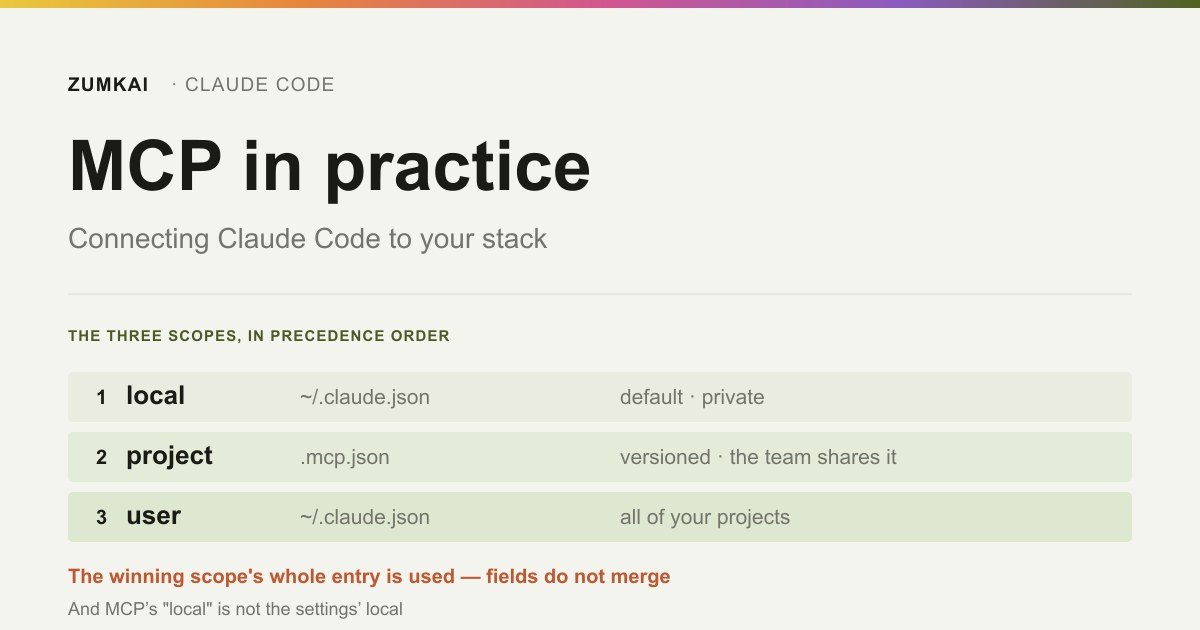
- The three scopes, and the trap in the name
- Precedence: who wins when the name repeats
- Environment variables in .mcp.json
- Project server approval, and where it does not happen
- Tool search: why adding a server barely costs anything now
- Authentication: OAuth and where it does not run
- Resources: the @ that is not a file
- Output limits
- Recipe: two servers from scratch
- Frequently asked questions
- Sources
Connect an MCP server once you catch yourself copying data from another tool into the chat. That is the official documentation's criterion, and it beats every other one out there.
The rest of this guide covers the three decisions that follow: which transport to use, which scope to install into, and what happens when the same server shows up in two places. All three have documented, counterintuitive answers.
When MCP earns its place, and when a CLI wins
MCP solves what has no decent CLI. For what does, the CLI is more context-efficient.
The official cost guidance is direct: prefer command-line tools where they exist, because they add no per-tool listing and the agent runs the command. gh, aws, gcloud and sentry-cli fall into that category.
What remains for MCP is what has no CLI, or a bad one: Figma, Notion, an internal database, a proprietary API, a monitoring tool with a dashboard and no terminal.
The list of cases the documentation uses as examples sets the tone: implementing a feature described in a Jira ticket and opening the PR, crossing Sentry data with feature usage, querying a database to find specific users, updating a template from a Figma design.
The common pattern: data you copy and paste today.
The five layers of a setup that survives production put MCP in the third layer, after context and capability, and that order matters, because an MCP server on top of a bad CLAUDE.md fills the context and nothing more.
The four transports
| Transport | When | OAuth support |
|---|---|---|
http | A remote server answering a request. The default for remote | Yes |
sse | A remote server with an event stream | Yes |
stdio | A local process on your machine | Not applicable |
ws | A remote server pushing events unprompted | No |
WebSocket carries two limitations that decide for you: no OAuth support, and the --transport flag rejects it. Authentication there runs through headers alone. Use HTTP unless the server has a real need to push events.
For a local server, one syntax trap breaks the first attempt:
claude mcp add --env AIRTABLE_API_KEY=YOUR_KEY --transport stdio airtable \
  -- npx -y airtable-mcp-server
The -- separates Claude Code's options from the command that runs the server. Without it, one of your server's flags (--port, say) would read as a Claude Code option.
And one --env detail produces a confusing error: if the server name comes right after --env, the CLI reads the name as another KEY=value pair and rejects it. Put at least one other option between the two, as in the example above.
A stdio server receives CLAUDE_PROJECT_DIR in its environment, pointing at the project root. That lets it resolve a relative path without depending on the working directory.
The three scopes, and the trap in the name
| Scope | Loads in | Shared | File |
|---|---|---|---|
| Local (the default) | The current project alone | No | ~/.claude.json |
| Project | The current project alone | Yes, through version control | .mcp.json in the root |
| User | All your projects | No | ~/.claude.json |
Read the last column again. MCP's "local" scope stores in ~/.claude.json, in your home folder, and not in the project's .claude/settings.local.json, where every other "local" setting in Claude Code lives.
The documentation itself flags the divergence. It is the kind of thing costing half an hour: you look for the server in .claude/settings.local.json, fail to find it, and conclude you never installed it.
What changes in practice:
Local is the default and suits an experimental server, or one with a credential you would rather not version. It gets registered inside that project's entry in ~/.claude.json, so it never leaks into your other projects.
Project is what the team shares. It generates a .mcp.json in the root, which you commit.
User applies across all your projects and stays private.
claude mcp add --transport http stripe https://mcp.stripe.com                       # local
claude mcp add --transport http shared --scope project https://example/mcp          # project
claude mcp add --transport http hubspot --scope user https://mcp.hubspot.com/anthropic  # user
Precedence: who wins when the name repeats
When the same server appears in more than one place, Claude Code connects once, using the definition with the highest precedence:
- Local
- Project
- User
- Plugin server
- claude.ai connector
Two rules from that list matter more than the order.
The fields do not merge. The winning scope's entire entry applies. If your project .mcp.json defines a URL and headers, and you have a local server of the same name carrying only the URL, the local one wins whole, and the project's headers go uninherited. That is the source of "why is the server unauthenticated when I configured a header?".
The duplicate criteria change with the source. The three scopes match by name. Plugins and connectors match by endpoint: a plugin pointing at the same URL or command as a server above it counts as a duplicate, even under a different name.
Environment variables in .mcp.json
This is what makes a versioned .mcp.json viable: the file reaches the repository without the API key inside it.
Two syntaxes:
${VAR}: expands to the variable's value${VAR:-default}: expands to the variable, or to the default if it does not exist
The expansion works in command, args, env, url and headers:
{
  "mcpServers": {
    "internal-api": {
      "type": "http",
      "url": "${API_BASE_URL:-https://api.example.com}/mcp",
      "headers": {
        "Authorization": "Bearer ${API_KEY}"
      }
    }
  }
}
The behavior when the variable is missing is the detail worth knowing: the config loads anyway. Claude Code reports a missing-variable warning in claude mcp list and uses the raw text ${VAR}, unexpanded. The server comes up with an authorization header reading Bearer ${API_KEY} word for word, and the failure surfaces on the first call.
That is why :-default earns its place wherever a reasonable fallback exists.
One exception confuses people: CLAUDE_PROJECT_DIR gets set in the server's environment, and not in Claude Code's. Referencing it in a .mcp.json needs a default, ${CLAUDE_PROJECT_DIR:-.}. Configuration arriving from a plugin is the only kind that substitutes the variable on its own.
Project server approval, and where it does not happen
A server coming from .mcp.json asks for approval in an interactive session, for safety. claude mcp reset-project-choices clears the choices.
But the prompt is missing from some sessions. The documentation lists where it does not appear:
- runs with
claude -p - Agent SDK sessions
- cloud sessions
- a session in
bypassPermissionswithskipDangerousModePermissionPrompt
In those contexts, the project server loads without asking.
That matters when you clone a third-party repository and run a non-interactive command inside it. The versioned .mcp.json comes along, and nothing consults you.
To block it in any mode, the route is disabledMcpjsonServers in the settings. You can also exclude whole project settings with --setting-sources.
Worth knowing that workspace trust protects part of this: a cloned repository cannot approve its own servers. Approvals committed in the project's .claude/settings.json get ignored in an untrusted folder, and the server sits at ⏸ Pending approval instead of connecting.
The recommendation is simple: read the .mcp.json before running Claude Code in a repository that is not yours, with the same care you would give a build script.
Tool search: why adding a server barely costs anything now
This is the change that alters the economics of installing MCP.
With tool search, on by default, tool definitions get deferred instead of loaded up front. Only the tool names and the server instructions enter the initial context. The agent uses a search tool to find what it needs, and only what it uses enters the context.
The effect: adding more MCP servers has minimal impact on the window. The documentation states that no fixed limit on tools per server exists, and that the practical limit is your context budget.
ENABLE_TOOL_SEARCH controls it:
| Value | Behavior |
|---|---|
| unset | Everything deferred, loaded on demand. The default |
true | Everything deferred, forcing the beta header through the proxy |
auto | Loads everything while the definitions stay under 10% of the window; defers past that |
auto:N | The same, with the threshold at N% |
false | Everything loaded up front |
Two restrictions are worth knowing. Tool search needs a model supporting tool_reference blocks: Sonnet 4.5, Haiku 4.5, Opus 4.5 and later. And it switches itself off when ANTHROPIC_BASE_URL points at a host that is not first-party, because most proxies do not forward those blocks.
For anyone writing an MCP server, the server instructions field grew more important: it is how the agent decides to search for your tools, on the same logic as a skill description. And a ceiling exists: tool descriptions and server instructions get truncated at 2 KB each. Put the essentials at the start.
Authentication: OAuth and where it does not run
Most remote servers require a login. Claude Code handles that with OAuth 2.0, and the flow is short:
claude mcp add --transport http sentry https://mcp.sentry.dev/mcp
claude mcp login sentry
claude mcp login runs the flow straight from the shell, without opening the /mcp panel inside a session. To clear the credentials afterward, claude mcp logout <name>.
The automatic behavior covers the normal case well. A request to a server you already signed into that returns 401 makes Claude Code refresh the token, reconnect and retry once, and flags the server in /mcp only if the retry fails too. If the server rejects the refresh token, a warning appears pointing at /mcp, with the option to reauthenticate before the next call breaks.
Where this fails: non-interactive mode. No /mcp panel exists in a claude -p run or an Agent SDK session, so the OAuth flow cannot run there. The current behavior is reasonable: Claude Code tells the agent that server's tools are unavailable until you authorize, and the agent can name which server needs a login instead of answering as though it did not exist. The authorization itself has to come from an interactive session.
One configuration trap: if you set headers.Authorization by hand and the server rejects that header, Claude Code reports a connection failure instead of falling back to OAuth. If OAuth was the intent, remove the header.
Resources: the @ that is not a file
An MCP server can expose resources, and you reference them with @, the same way you reference a file.
Typing @ in the prompt lists the resources from every connected server, mixed in with the files in the autocomplete. The format is @server:protocol://path:
Analyze @github:issue://123 and suggest a fix
Compare @postgres:schema://users with @docs:file://database/user-model
Claude Code fetches and attaches the resource on reference, and the path is searchable through fuzzy matching in the autocomplete.
That solves a case that defeats tools: you know which piece of data you want and would rather the agent spent no turns discovering it. Instead of asking "find issue 123 on GitHub" and waiting through two tool calls, you paste the reference and the content arrives with the prompt.
The AI tools directory gathers the ones worth connecting through MCP and the ones already carrying a better CLI.
Output limits
An MCP server returning a lot of text poisons the context fast. Three numbers are worth knowing:
| Number | What it is |
|---|---|
| 10,000 tokens | The warning threshold, where Claude Code flags the output size |
| 25,000 tokens | The default maximum, adjustable through MAX_MCP_OUTPUT_TOKENS |
| 500,000 characters | The absolute ceiling for a tool declaring its own limit |
export MAX_MCP_OUTPUT_TOKENS=50000
claude
Anyone writing a server has a better option than asking users to raise the variable: declare _meta["anthropic/maxResultSizeChars"] in that tool's tools/list response. It suits output that is large by nature and necessary, such as a database schema or a complete file tree.
{
  "name": "get_schema",
  "description": "Returns the complete database schema",
  "_meta": { "anthropic/maxResultSizeChars": 200000 }
}
Without the annotation, a result above the limit gets persisted to disk and replaced by a file reference in the conversation, which is the right behavior in most cases and still surprises anyone expecting the content inline.
One caveat: the annotation covers text content alone. A tool returning an image stays subject to MAX_MCP_OUTPUT_TOKENS.
Recipe: two servers from scratch
A remote one, for the team, versioned with the key outside the file:
claude mcp add --transport http linear --scope project https://mcp.linear.app/mcpThe generated .mcp.json goes to the repository. If you need a header, use variable expansion and document the variable in the README.
A local one, yours alone, for a tool with no CLI:
claude mcp add --env NOTION_TOKEN=your_token --transport stdio notion \
  -- npx -y @notionhq/notion-mcp-server
After installing, three commands close the loop:
claude mcp list: what you configured, and the state of each one/mcpin the session: what is live, with the option to switch things off/context: how much context the servers occupy
The last one prevents accumulation. Review that list as often as you review a package.json dependency.
Most MCP servers today arrive packaged as plugins, which changes what you have to check first. The criterion sits in plugins and marketplaces: how to evaluate before installing.
Frequently asked questions
MCP or CLI, when both exist?
The CLI. The official cost guidance is explicit: a command-line tool is more context-efficient because it adds no per-tool listing. Save MCP for what has no decent CLI.
I installed the server and Claude does not use its tools.
With tool search on, the agent searches for the tool when the task calls for it. If it never searches, the server instructions are the likeliest culprit, describing when it helps in terms too broad, and those get truncated at 2 KB, so the essentials have to come first. Run /mcp to confirm the server connected.
I set a header in .mcp.json and it does not apply. Why?
A server of the same name in local scope is the usual cause, and local takes precedence. And the fields do not merge: the local entry wins whole, inheriting none of the project's headers. Confirm with claude mcp get <name>.
Is it safe to run Claude Code in a repository with a third-party .mcp.json?
With caution. In an interactive session you get an approval prompt, and a cloned repository cannot approve its own servers. But in claude -p, in the Agent SDK and in a cloud session that prompt does not exist. Read the .mcp.json first, or use disabledMcpjsonServers.
Sources
- Anthropic — Claude Code Docs: Connect Claude Code to tools via MCP. Accessed 20 August 2026.
- Anthropic — Claude Code Docs: Manage costs effectively. Accessed 19 August 2026.
- Anthropic — Claude Code Docs: Extend Claude with skills. Accessed 19 August 2026.
- Anthropic — Claude Code Docs: Settings. Accessed 20 August 2026.
- Anthropic — Claude Code Docs: Sub-agents. Accessed 20 August 2026.
Verified on 20 August 2026.
Review trigger: revisit when (a) the 10,000 and 25,000 token limits or the 500,000 character ceiling change, (b) tool search stops being the default or its 10% threshold moves, (c) the precedence order between scopes changes, or (d) the 2 KB truncation on tool descriptions changes.
Read next

Motion •
Motion Design for the Web: The Complete Guide
Scroll, text, images and video: the complete catalog of motion techniques for the web, with implementation in Next.js and the cases where each one pays off.
- motion
- scroll

The definitive guide — a Next.js site built around motion and scroll
The scroll foundation that, when missing, keeps the animations from working at all: Lenis, GSAP and Next.js wired in the right order and the mistakes to avoid.
- next.js
- lenis

Infra •
Documentation: deploying a Next.js application with GitHub + Hostinger
Every push becomes a live site with no hosting panel involved: connecting GitHub to Hostinger, the build settings that break and the checks after each deploy.
- deploy
- github